Why is it a good idea to use your own domain account?
When you send email sendouts from Survey Automator, you can choose to link a Microsoft or Google account. This means that emails are sent directly from your (or your customer’s) own domain instead of from the platform’s default domain.
The benefits are:
- Higher delivery reliability —emails sent from a known and trusted domain are less likely to end up in spam.
- Better sender identity —the recipient recognizes the sender, which increases the open rate.
- Control over domain reputation – you can control how your domain is used and avoid sharing the sending domain with other senders.
- Flexibility – you can use the customer’s domain by inviting them as a Client and letting them link their account.
By default, mailings are limited to 12 emails per hour, which is a safety measure to prevent damage to the domain’s reputation.
Here’s how to do it step by step
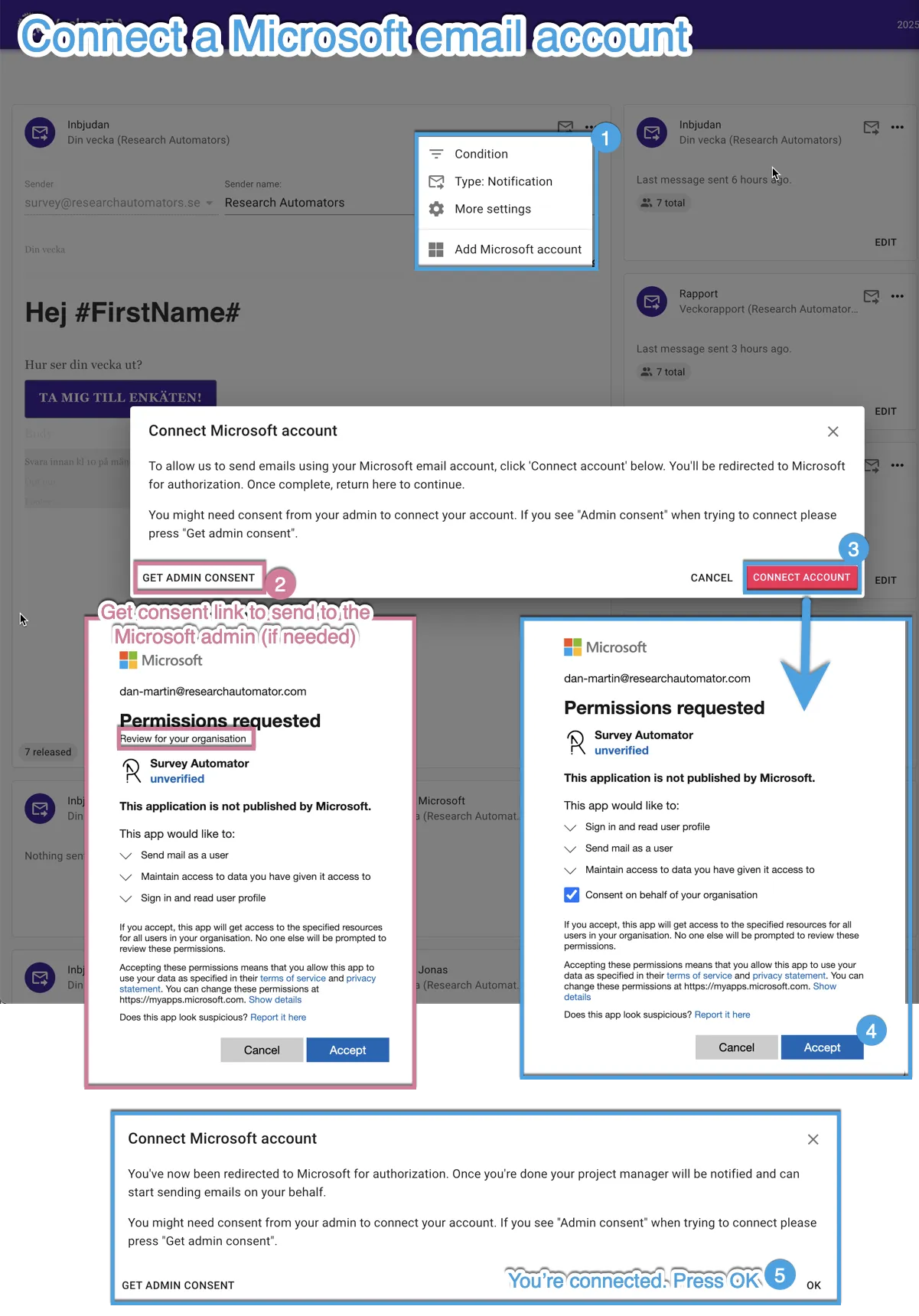
- Open your project and go to the Distribute tab.
- Find the campaign card (the distribution you want to work with).
- Click the three dots (⋯) in the upper-right corner of the card.
- Select “Add Microsoft Account / Google Account.”
- Sign in with the account you want to use (your own or the customer’s).
- Once the account is linked, you can select it as the sender for your mailings.
Going forward, your emails will be sent directly through the selected domain.
You can change the domain you use to send emails from if you want to switch back.